ICT Practical Examination
Good Luck!
Tuesday, 2 December 2025
INSTRUCTIONS
- Create a static website based on a given case study.
- The website must be built using HTML for structure and Tailwind CSS for styling.
- Your final output should be a single HTML file containing all the necessary code, including the link to the Tailwind CSS CDN.
- The CDN can be accessed on the Tailwind CSS website. Link: Tailwind CDN
- Ensure your website is responsive and user-friendly.
Time Allotment
120 Minutes
Case Study: BMI Calculator
Context
You are working as a Junior Web Developer tasked with perfecting a simple web-based health status checker system. This system is used to calculate the Body Mass Index (BMI) and determine a person's weight status category. The system must be able to:
- accept input for Weight (kg) and Height (cm).
- retrieve relevant identity data (Name and Activity Level) from a master data array based on the selected ID.
- calculate the BMI value and determine the Weight Status based on the result of the calculation.
Task
Start by analyzing the basic structure of the psas-1.html file to identify the variables, loops, and HTML IDs that will be modified in the Task.
- Understand the structure of clientData array and how the for/foreach loop works, which is used to search for client data.
- Create a JavaScript object array named clientData that contains the clients’ master data by adding data for 5 new clients from the following table to the clientData array:
- Ensure all HTML IDs for displaying results and input have been correctly identified.
- Display clients data in a dropdown list by looping (foreach) on the clientData array.
- Modify the JavaScript function calculateBMI() to perform the following steps:
- Get the input values for Weight (kg) and Height (cm).
- Search for the client data using a for loop and the selected client ID. from master data
- Calculate the BMI using the formula:
- Determine the Weight Status (Health Status) using an if...else if...else structure based on the following BMI criteria:
- Modify the outBMI, outStatus, and other information (Client’s Name, Client’s Activity, height in cm, weight) elements based on the example output so that:
- it displays the Weight Status text (e.g., "Obese", ) calculated in step 6.
- it applies the appropriate styling class (e.g., bg-green-100 text-green-700) to the outStatus element based on the resulting BMI Status.
| id | clientName | Activity |
|---|---|---|
| C005 | Rina Kartika | High Intensity |
| C008 | Ahmad Wijaya | Low Intensity |
| C019 | Ragil Firman | High Intensity |
| C034 | Supriadi | Moderate Intensity |
| C050 | Dhiatama Nisa | Low Intensity |
BMI = Weight (kg) / (Height (m))2
| BMI Score | Weight Status | colorClass |
|---|---|---|
| ≥ 30.0 | OBESE | bg-red-100 text-red-700 |
| 25.0 ≤ BMI < 30.0 | OVERWEIGHT | bg-yellow-100 text-yellow-700 |
| 18.5 ≤ BMI < 25.0 | NORMAL WEIGHT | bg-green-100 text-green-700 |
| < 30.0 | UNDERWEIGHT | bg-blue-100 text-blue-700 |
Challenge Plus Point
Add input validation at the beginning of the checkGrade() function.
- if the input (Client ID, Weight, and Height) is invalid (empty or outside the 0-300 range).
- Then display an error message ('Error! Client’s data is not valid.') using alert().
Submission
- Save your file as [PSAS_FullName_Class].html. (eg. PSAS_Putera Islamiyadi_X1.html)
- Ensure the code is well-structured and easy to read.
Output References
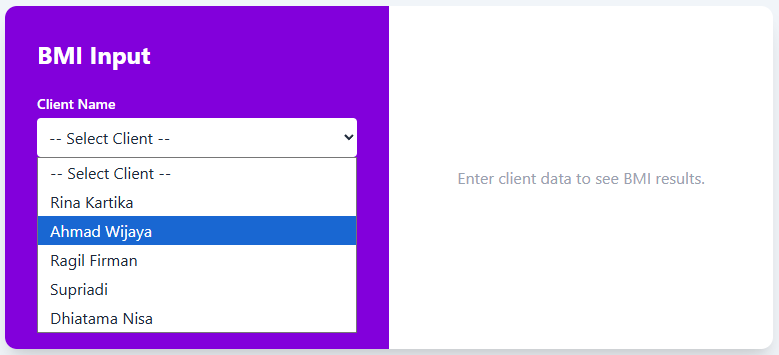
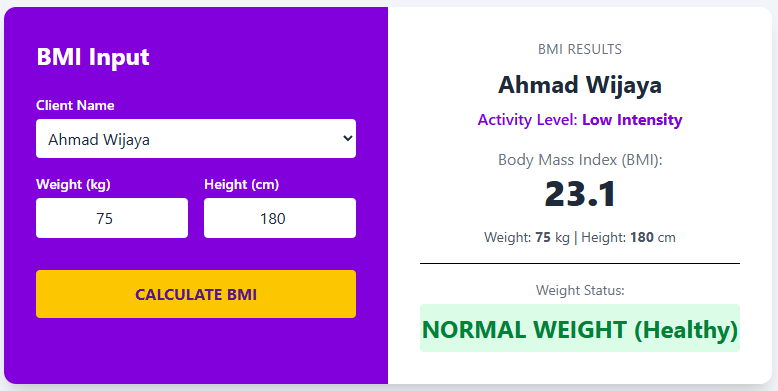
×
![]()